
Overview
Reconciling the transactions processed through OPI against your Payment Service Provider's own reports is a critical part of the payment integration in Oracle OPERA Cloud. OPERA Cloud's Manage Reports screen is where you generate the report used for this balancing process. Use this procedure to access it as part of your reconciliation routine.
Applies to
| Product | Juno Hospitality Suite |
| Integration | Oracle OPERA Cloud (via OPI Cloud Service) |
| Version | Cloud |
| Audience | Finance / Back office |
Operational steps
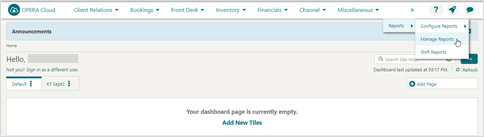
- From the OPERA Cloud menu, select Reports, then select Manage Reports.
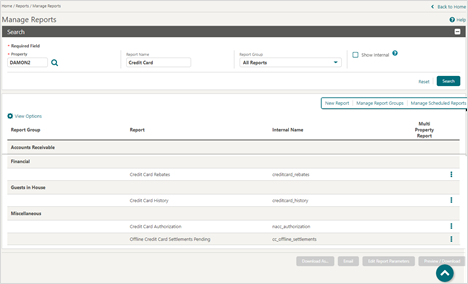
- Enter a Report Name and/or select a Report Group from the drop-down list.
- Click Search to display the report.
Need more help?
If you're not sure which report to search for, or the report doesn't match your Payment Service Provider's figures, contact 934 Support (support@weare934.com) or your Customer Success Manager with your property name. They will inform you about Juno Portal.
Comments
0 comments
Article is closed for comments.