
Overview
Oracle OPERA Cloud lets front office staff charge a guest's previously tokenised card on file at any time during their stay, directly from the reservation's billing screen. Use this procedure when the guest already has a card on file and you don't need to take a new card or authorisation.
Applies to
| Product | Juno Hospitality Suite |
| Integration | Oracle OPERA Cloud |
| Version | Cloud |
| Audience | Front office |
What you'll achieve
After completing these steps, the amount you enter will be charged to the guest's tokenised card on file and applied to the reservation, subject to processing by the relevant payment provider.
Before you start
- The reservation must already have a tokenised card on file — this procedure charges an existing card, it doesn't collect a new one.
- Depending on your OPERA Cloud configuration, you may be asked to log in with a Cashier ID and PIN before you can post the payment.
Operational steps
- From the OPERA Cloud menu, select Bookings, then Reservations, then Manage Reservation.
- Search for and open the reservation.
- Click I Want To... and select Billing.
If you're asked to log in as cashier
- Select your Cashier ID.
- Enter your PIN.
- Click Login. The Billing Information screen appears.
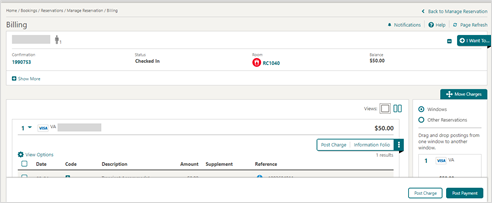
- Click Post Payment.
- Enter the payment Amount to be charged.
- Click Apply Payment.
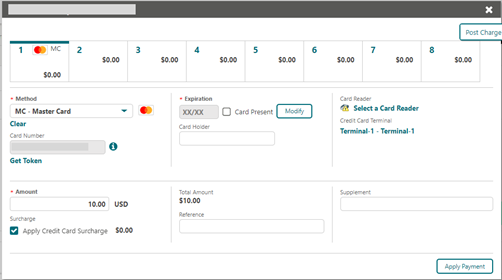
Expected result
The payment is processed and applied to the reservation.
Need more help?
If the payment doesn't post, or you're not sure whether it was taken from the card on file, contact 934 Support (support@weare934.com) with the amount, last 4 digits from the credit card and the date and time. Do not send full card numbers or login credentials by email or chat.
Comments
0 comments
Article is closed for comments.