
Overview
Oracle OPERA Cloud lets front office staff settle a guest's outstanding folio balance and complete check-out, either against the card already on file or a new card. Use this procedure when a guest is ready to check out and their charges need to be settled.
Applies to
| Product | Juno Hospitality Suite |
| Integration | Oracle OPERA Cloud (via OPI Cloud Service, Chip and PIN card terminal when a new card is used) |
| Version | Cloud |
| Audience | Front office |
What you'll achieve
After completing these steps, the guest's outstanding folio balance will be settled against their card, and the guest will be checked out.
Before you start
- The guest must be checked in and ready to check out, with a payment method already on the reservation.
- Know whether the guest is settling on the card already on file, or providing a new card — the steps differ slightly for each.
- Depending on your OPERA Cloud configuration, you may be asked to log in with a Cashier ID and PIN.
Operational steps
- From the OPERA Cloud menu, select Front Desk, then In House.
- Search for and open the reservation.
- Click I Want To… and select Check Out.
If you're asked to log in as cashier
- Select your Cashier ID.
- Enter your PIN.
- Click Login. The Folio Settlement confirmation screen appears.
Verify the card on file
- If replacing the main card with a new card: update the payment method, verify the amount, and click Settle and Send Folio. This triggers the payment device to capture the new card, and you can continue with the next section once that's complete.
- If settling on the same card already on file: continue with the next section.
Settle and check out
Verify the Amount to be settled and click Settle and Send Folio (if you haven't already done so while replacing the card above).
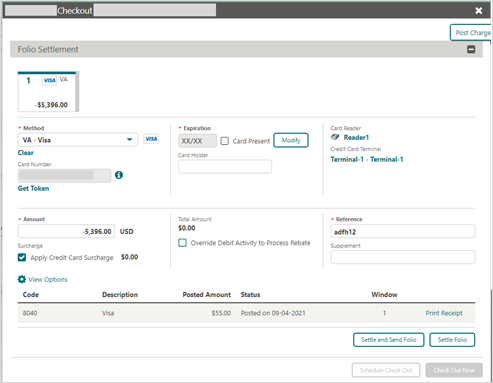
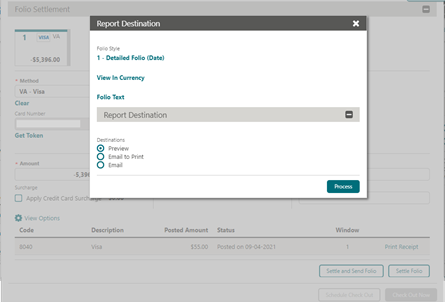
- Select the Destination option for the folio, then click Process to view the report.
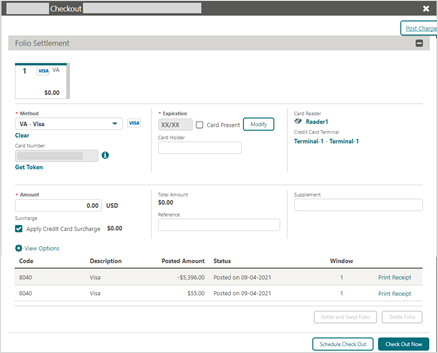
- Click Check Out Now.
Expected result
The guest is checked out successfully. Click Go to Reservation to review the reservation's details.
Need more help?
If Settle and Send Folio fails, or the guest isn't checked out after clicking Check Out Now, contact 934 Support (support@weare934.com) with the amount, last 4 digits from the credit card and the date and time. Do not send full card numbers or login credentials by email or chat.
Comments
0 comments
Article is closed for comments.