
Overview
A Top Up Authorisation lets front office staff take an additional payment authorisation during a guest's stay, on top of an authorisation already in place. Use this procedure when you need to increase the amount held against a guest's card partway through their stay, for example to cover additional charges.
Applies to
| Product | Juno Hospitality Suite |
| Integration | Oracle OPERA Cloud |
| Version | Cloud |
| Audience | Front office |
What you'll achieve
After completing these steps, an additional authorisation amount will be requested on the selected payment method, subject to processing by the relevant payment provider.
Before you start
- A payment method must already be on the reservation, since this procedure adds to an existing authorisation rather than creating a new one.
- Know the amount you need to authorise, and which payment method or window it applies to.
Operational steps
- From the OPERA Cloud menu, select Bookings, then Reservations, then click Manage Reservation.
- Search for and open the reservation.
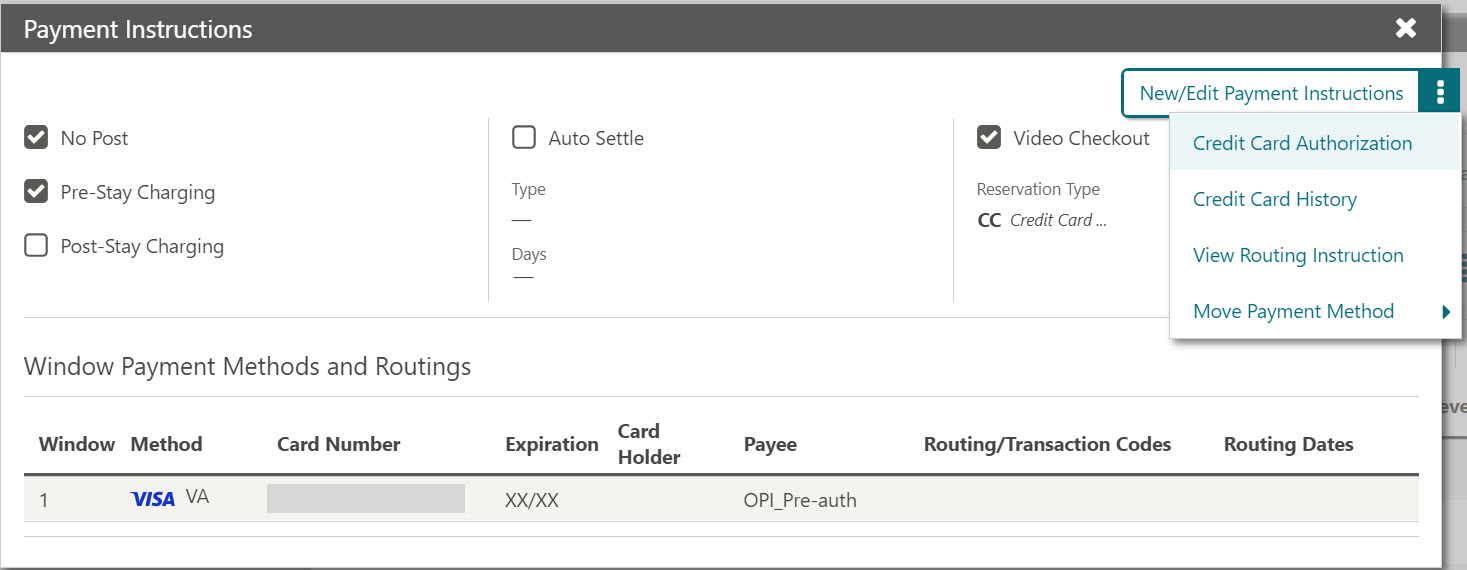
- Click I Want To… and select Payment Instructions.
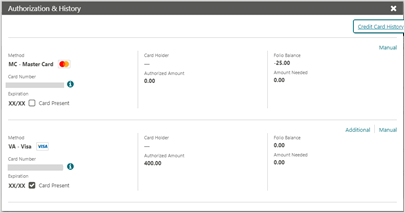
- Click the vertical ellipsis (⋮) and select Credit Card Authorization. The Authorization and History screen appears.
- Select the Additional option to obtain an additional authorisation amount on the required payment method or window.
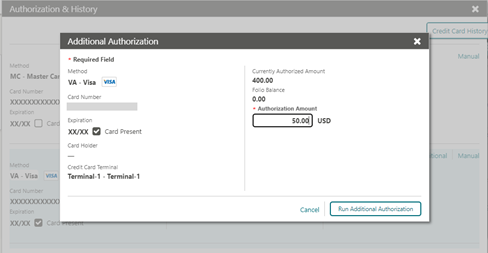
- Enter the Authorization Amount.
- Click Run Additional Authorization.
Expected result
The payment processing screen appears while the request is handled, and confirmation of the posted authorisation appears in the Authorization and History screen.
Need more help?
If Run Additional Authorization fails, or no confirmation appears in the Authorization and History screen, contact 934 Support (support@weare934.com) with the amount, last 4 digits from the credit card and the date and time. Do not send full card numbers or login credentials by email or chat.
Comments
0 comments
Article is closed for comments.