
Overview
Oracle OPERA Cloud lets front office staff guarantee a reservation by manually entering a guest's credit card details into a hosted token-entry form, known as OPERA Pay. The card is tokenised immediately and only a masked card number and expiry date are returned to OPERA Cloud — the full card number is never stored in OPERA itself. Use this procedure whenever a guest gives you their card details over the phone or in person and you need to attach a guarantee to their reservation.
Applies to
| Product | Juno Hospitality Suite |
| Integration | Oracle OPERA Cloud (via OPI Cloud Service / OPERA Pay) |
| Version | Cloud |
| Audience | Front office |
Before you start
- You need the CCTRANS role assigned to your OPERA Cloud user account to access the hosted token-entry form.
- Have the reservation, and the guest's card number and expiry date, ready before you start — enter these directly into the form rather than writing them down elsewhere.
- A "Credit Card Manually entered" confirmation prompt may or may not appear during this process, depending on your property's configuration.
Operational steps
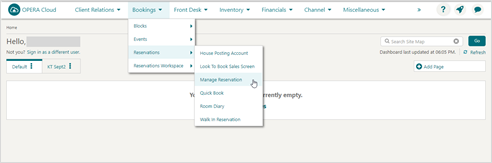
From the OPERA Cloud menu, select Bookings, then Reservations, then Manage Reservation.
Search for and open the reservation.
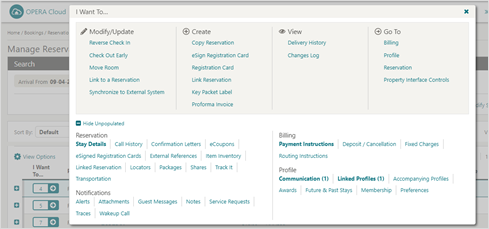
Click I Want To… and select Payment Instructions.
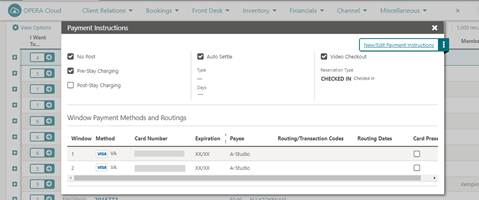
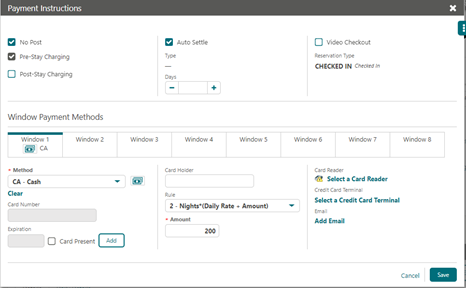
- Click New/Edit Payment Instructions. The Card Number and Expiration fields on this screen are disabled and can't be edited directly.
Add the card details
- Click Add to manually add credit card details. The OPI Cloud Service screen appears.
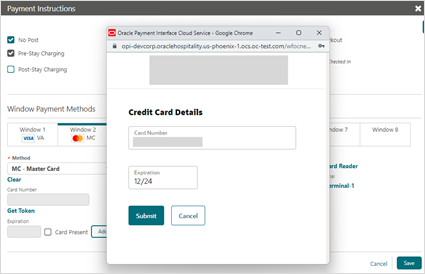
- Enter the Credit Card Number.
- Enter the Expiration date.
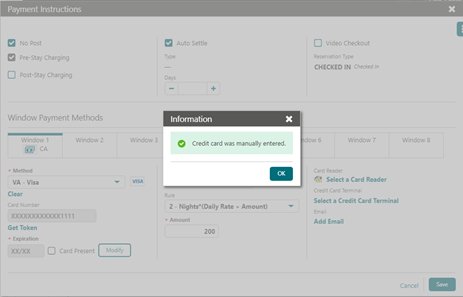
- Click Submit. The card details are converted to a token, and the Payment Instructions screen displays a confirmation message.
Confirm and save the token
- Click OK. The masked Card Number and Expiration fields appear. Click Modify at this point if you need to update the card details.
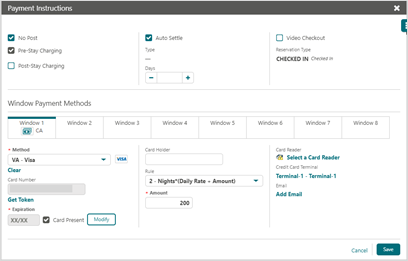
2. Click Save to attach the token to the reservation.
Expected result
The reservation now shows a masked card number and expiry date under Payment Instructions, confirming the card guarantee has been tokenised and saved. The original card number is not stored or displayed anywhere in OPERA Cloud after this point.
Need more help?
If the token-entry form doesn't appear, or Submit fails, contact 934 Support (support@weare934.com) with the reservation number, last 4 digits from the credit card and the date and time you attempted to post the payment. Do not send full card numbers, Cashier PINs, or other login credentials by email or chat.
Comments
0 comments
Article is closed for comments.